- Tap on the green “open camera” button.
How to Record a Story on StoryMight
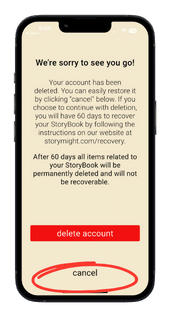
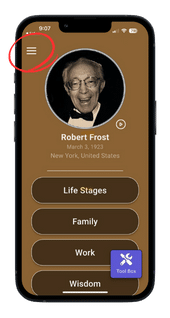
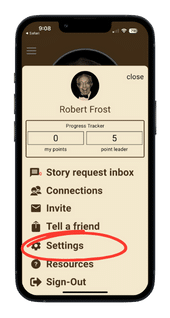
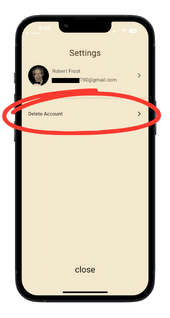
Tap the hamburger icon on the upper left corner of the Home Page. > Tap “settings” on the menu screen. > Tap “Delete Account” on the Settings screen. > Check the box on the Delete Account screen and then tap the red “delete account” button. > On the “We’re sorry to see you go!” screen you will be given the option to restore your account by tapping “cancel” or continue with deletion by clicking the red “delete account” button. (once tapping the red “delete” button you will have 60 days to recover your StoryBook by following the instructions on the website at storymight.com/recovery. After 60 days all items related to your StoryBook will be permanently deleted and will not be recoverable).
Step by step instructions
1. Tap the hamburger icon on the upper left corner of the Home Page.
2. Tap “settings” on the menu screen.
3. Tap “Delete Account” on the Settings screen.
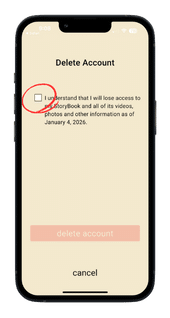
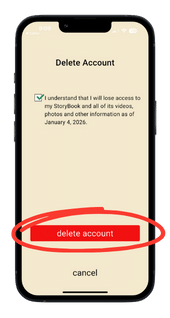
4. Check the box on the Delete Account screen and then tap the red “delete account” button.
5. On the “We’re sorry to see you go!” screen you will be given the option to restore your account by tapping “cancel” or continue with deletion by clicking the red “delete account” button. (once tapping the red “delete” button you will have 60 days to recover your StoryBook by following the instructions on the website at storymight.com/recovery. After 60 days all items related to your StoryBook will be permanently deleted and will not be recoverable).